Create tables and generate QR codes in minutes
Set up your restaurant tables, assign capacities, and print a unique QR code for every table. Each code links straight to your digital menu so guests can order from their seat.
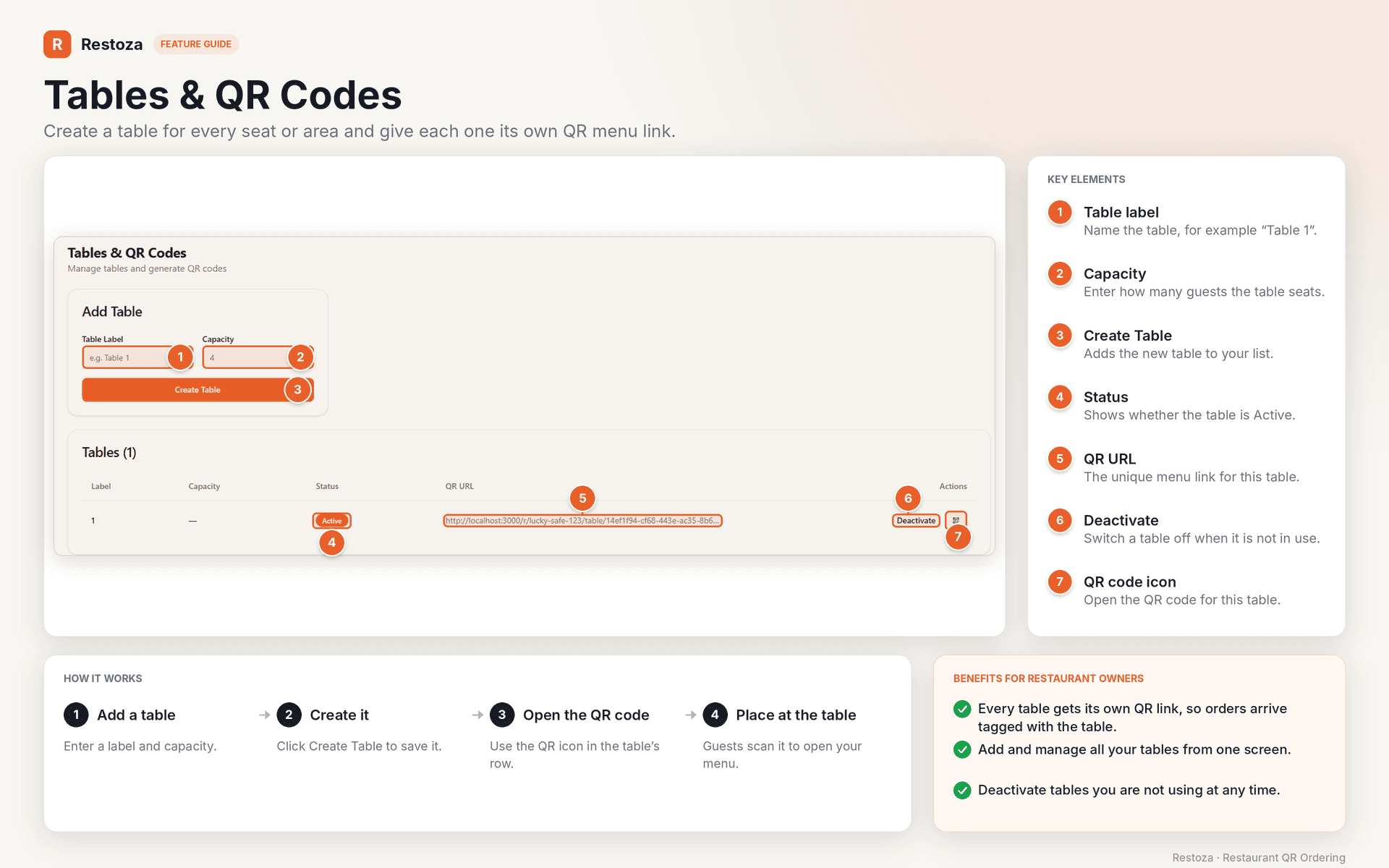
Table to order flow
- You create a table in the dashboard.
- Restoza generates a table-specific QR code.
- Customer scans and orders from that table.
- The order arrives tagged with the table number.
What is Table & QR Management?
Table & QR Management lets you set up your dining area in Restoza. You create each table, give it a name or number (for example, Table 1 or Terrace 2), and choose how many people it seats. For every table, Restoza generates a unique QR code that links directly to your published digital menu.
You print the codes and place them on the tables. Because each code is tied to a specific table, every order placed through it arrives in your dashboard already labelled with that table number — so your staff know exactly where to bring the food.
What problem does it solve?
Confusion about which table ordered
Without table-linked codes, staff often have to ask customers which table they are at. QR codes remove the guesswork — every order carries its table number.
Complicated setup
Creating and printing QR codes for every table can feel technical. Restoza generates the codes for you, so you just print and place them.
How does it work?
In the dashboard, you add your tables one by one, set a label and capacity for each, and Restoza generates a matching QR code. You download or print the codes and display them on the corresponding tables. When a guest scans a code, your digital menu opens on their phone, and any order they place is linked to that table. You can activate or deactivate tables at any time from the dashboard.
Step-by-step: set up your tables
Create a table
Add a table in the dashboard, give it a label such as Table 1, and set its seating capacity.
Generate a QR code
Restoza creates a unique QR code for the table that links directly to your digital menu.
Print and place it
Print the QR code and place it on the table so customers can scan and order.
Manage table status
Activate or deactivate tables as needed, and keep track of which tables are open for orders.
Key benefits for restaurant owners
One QR per table
Every order is automatically tagged with the correct table number.
Easy setup
Create tables and print QR codes in minutes — no technical setup needed.
Flexible control
Activate or deactivate tables depending on your seating and service.
Related features
Pair table management with these tools: