Let guests order from their phone with a QR code
Turn every table into a self-ordering station. Customers scan the QR code on their table, browse your digital menu, and place an order — all without downloading an app or waiting for a server.
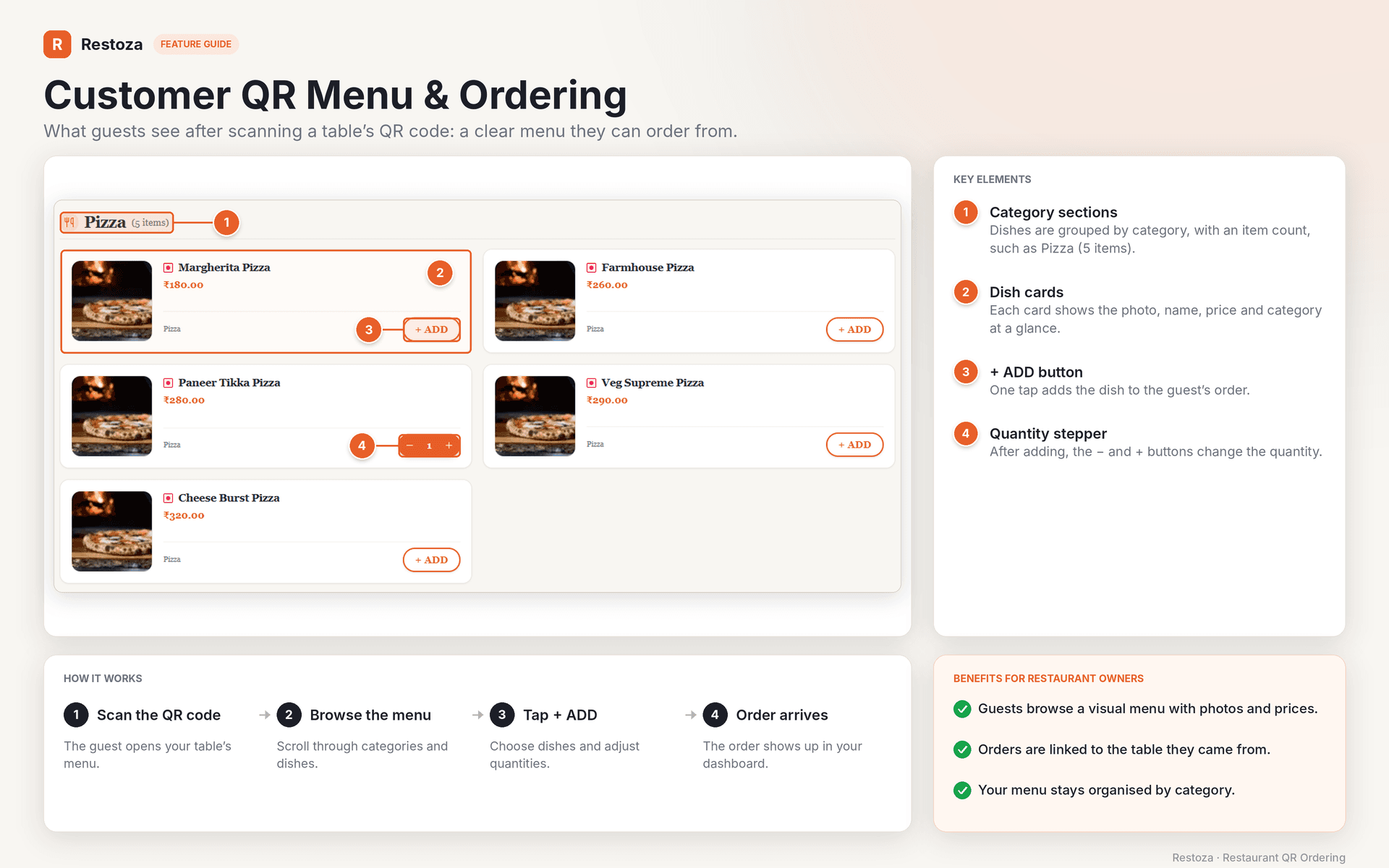
How a QR order flows
- Guest scans the table QR code and opens your menu.
- They browse dishes, pick quantities, and add to cart.
- They enter their name and phone, then place the order.
- You receive the order in your dashboard with the table number.
What is Smart QR Ordering?
Smart QR Ordering is Restoza's table-side ordering feature. Each of your restaurant tables gets a unique QR code. When a customer scans it with their phone, your digital menu opens right in their browser. They can browse categories, see dish photos and prices, choose quantities, add preparation notes, and submit an order — no app installation and no waiter needed to take the order.
Because the QR code is tied to a specific table, every order arrives in your dashboard already labelled with the correct table number, so your staff know exactly where to deliver the food.
What problem does it solve?
Long waits to order
During busy periods, customers often wait several minutes for a server to take their order. With QR ordering, guests can place their order the moment they are seated.
Order mistakes and lost tickets
Handwritten or verbally taken orders can be misheard or misplaced. QR orders are typed by the customer and sent directly to your dashboard, reducing errors and keeping every ticket in one place.
How does it work?
After you set up your restaurant and create your tables in Restoza, the system generates a unique QR code for each table. You print and place these codes on the tables. When a customer scans a code, your published digital menu opens on their phone. They build their cart and submit the order, which appears instantly in your dashboard as a new order ready to be accepted.
Step-by-step: from scan to served
Place a QR code on each table
Print and display the unique QR code generated for every table at your restaurant.
Customer scans the QR code
The guest opens their phone camera, scans the code, and your digital menu opens instantly — no app download needed.
Browse and add to cart
Customers browse categories and dishes, select quantities, add special notes, and add items to their cart.
Place the order
The guest enters their name and phone number, then submits the order. Your restaurant receives it immediately in the dashboard.
Key benefits for restaurant owners
No app required
Customers order straight from their phone browser — nothing to download.
Faster table turnover
Guests order as soon as they sit down, without waiting for a waiter.
Accurate orders
Orders go straight to the kitchen dashboard with the customer's details and table number.
The customer experience
From the customer's perspective, ordering is as simple as scanning a code. There is no app to install, no account to create, and no payment terminal to wait for. They see your actual menu with photos and prices, choose what they want, enter their name and phone number so you can reach them, and place the order. They receive confirmation that the order was sent, and they can relax while the kitchen prepares it.
Because the order is linked to their table, your staff can bring the food directly to them without needing to ask which table ordered what.
Related features
Pair QR ordering with these tools: